
Table of Contents
In the fast-paced world of modern networking, the physical business card has undergone a digital transformation. The integration of QR technology into professional networking collateral allows for the instantaneous transfer of contact data, bypassing the friction of manual data entry. However, as this technology becomes ubiquitous, the margin for error shrinks. Handing a potential client or executive a business card with a broken, unscannable, or poorly designed QR code is the modern equivalent of handing them a card with a typo in your phone number. It immediately degrades your professional brand.
If you are asking, what are common QR business card mistakes, you are already ahead of the curve. Most professionals treat matrix barcodes as a simple graphic design element, completely misunderstanding the underlying digital infrastructure and optical scanning requirements necessary for them to function.
This comprehensive guide dissects the technical, design, and strategic errors professionals make when deploying digital business cards. We will explore the architecture of vCard QRs, how to optimize them for maximum scan rates, and how enterprise platforms ensure your networking assets never expire.
What is a QR Business Card (vCard QR)?
A QR business card is a traditional physical networking card—or a purely digital asset displayed on a smartphone screen—that features a customized Quick Response (QR) code. When scanned by a mobile device’s native camera, this code prompts the device to instantly download and save the individual’s contact information.
Technically, there are two primary architectures for these codes:
- The Direct vCard/MECARD: The QR code mathematically encodes the actual text data (Name, Phone, Email) directly into the black-and-white pixel pattern.
- The Dynamic vCard Plus: The QR code encodes a short URL that routes the user to a mobile-optimized digital profile or instantly triggers a
.vcf(Virtual Contact File) download from a secure server.
Understanding the difference between these two structures is the first step in avoiding catastrophic networking errors.
How Does a QR Business Card Work?
To understand why common mistakes cause QR codes to fail, we must look at the mechanical process of an optical scan.
- Optical Recognition: When a smartphone camera is pointed at the card, the software searches for the three Finder Patterns (the large squares in the corners). This tells the lens the orientation and size of the code.
- Luminance Evaluation: The camera software evaluates the contrast between the dark data modules (the pixels) and the light background to separate the data from the physical paper.
- Error Correction Decoding: The scanner reads the matrix, utilizing built-in Reed-Solomon error correction algorithms to reconstruct any data obscured by scratches, poor printing, or smudges.
- Data Execution: Once decoded, the smartphone’s operating system recognizes the data format. If it detects a URL, it opens the browser. If it detects a
.vcffile structure, it bypasses the browser and directly opens the native Contacts app (Apple Contacts or Google Contacts), pre-filling the fields.
Any mistake in design, printing, or backend routing disrupts this four-step process, resulting in a failed scan.
The Core Topic: What Are Common QR Business Card Mistakes?
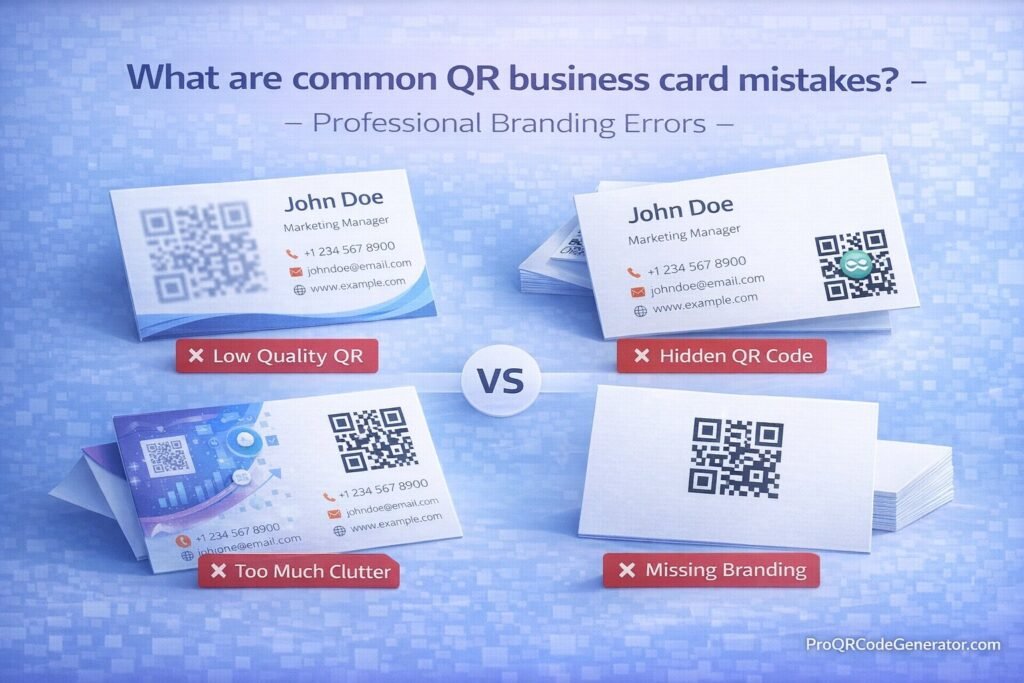
When evaluating professional branding errors in digital networking, the mistakes generally fall into three categories: Technical Infrastructure, Graphic Design, and User Experience (UX).
Mistake 1: Using Static QR Codes Instead of Dynamic Codes
This is the single most expensive mistake a professional can make. If you use a free generator to create a static QR code for your business card, all your contact information is hardcoded into the printed image.
- The Error: If you get a promotion, change your office address, or update your phone number, the physical cards are completely obsolete. You cannot change the data.
- The Fix: Utilizing a dynamic QR code from a platform like ProQRCodeGenerator.com. Dynamic codes encode a routing link. You can update your job title or phone number in your digital dashboard at any time, and every physical card you have ever handed out will instantly route to the updated information.
Mistake 2: Ignoring the “Quiet Zone”
A QR code requires a mandatory border of blank space around its perimeter, known as the “Quiet Zone.”
- The Error: Graphic designers often try to maximize space by pushing text, logos, or background patterns right up against the edges of the QR matrix. When this happens, the smartphone camera cannot distinguish where the QR code ends and the design begins, rendering it unscannable.
- The Fix: Always maintain a clear margin equivalent to at least four data modules (the small squares within the code) on all four sides.
Mistake 3: Poor Sizing and Resolution
A business card is a small canvas (typically 3.5 x 2 inches).
- The Error: Shrinking the QR code too much to make room for traditional text. If a code is smaller than 0.8 x 0.8 inches (2 x 2 cm), most smartphone lenses cannot focus on the intricate data matrix. Furthermore, downloading the code as a low-resolution PNG or JPG will cause the edges to blur when printed, destroying the optical readability.
- The Fix: Keep the code at least 1 inch wide. More importantly, always download your QR code as a Vector file (SVG, EPS, or PDF). Vector files use mathematical lines rather than pixels, ensuring razor-sharp edges during the commercial printing process.
Mistake 4: Low Contrast and Inverted Colors
Brand consistency is important, but physics dictates scannability.
- The Error: Printing a light gray QR code on a white card, or trying to invert the code by printing a white QR pattern on a dark background. While modern premium phones can sometimes read inverted codes, older devices cannot. Scanning relies on the camera finding dark points on a light background.
- The Fix: Always maintain a high contrast ratio. The data pattern should be significantly darker than the background color.
Mistake 5: Overcrowding the Card Design
The purpose of a QR business card is to eliminate the need for manual typing.
- The Error: Printing your name, title, address, phone, email, fax, website, and social handles on the card, and then squeezing a QR code into the corner. This creates visual clutter.
- The Fix: Embrace minimalism. Print your name, your title, your company logo, and a prominent QR code. Let the dynamic vCard handle the heavy lifting of storing the granular contact details.
Mistake 6: Forgetting a Call to Action (CTA)
Do not assume the recipient knows what the code does.
- The Error: Placing an orphaned, floating square on the back of a card with no context. The recipient might think it links to a generic corporate homepage and ignore it.
- The Fix: Add a micro-copy frame around or below the code. Simple phrases like “Scan to Save Contact” or “Scan for Portfolio” increase scan-through rates by explicitly stating the value proposition.
The Benefits of a Flawless Digital Business Card
When you avoid common QR business card mistakes and execute the strategy perfectly, the benefits to your professional brand are substantial:
- Instant CRM Integration: For sales professionals, a flawless scan means your data is instantly deposited into the prospect’s phone. You bypass the “stack of cards on the desk” graveyard.
- Unlimited Data Storage: A physical card is limited by 7 square inches of space. A dynamic vCard Plus can hold high-resolution headshots, links to your calendar booking software (like Calendly), embedded introductory videos, and links to your LinkedIn profile.
- Eco-Friendly and Cost-Efficient: By transitioning to a single NFC/QR hybrid card or keeping the code on your phone’s lock screen, you eliminate the need to print thousands of paper cards over your career.
Business Applications and Industry Examples
Different industries leverage dynamic networking tools in unique ways. Avoiding branding errors is critical depending on the use case.
Real Estate Agents
Real estate agents rely heavily on personal branding. A common mistake here is failing to include a professional headshot. By using a dynamic vCard, an agent can embed their headshot directly into the digital contact file, ensuring their face appears in the client’s phone directory next to their name. They can also include direct links to current property listings.
Enterprise Sales Teams
For B2B sales teams attending trade shows, speed is everything. Handing out a poorly sized, unscannable code in a dimly lit convention hall is a catastrophic failure. Elite sales teams use high-contrast, perfectly sized dynamic codes that not only transfer their contact info but also link directly to a “Book a Demo” calendar, reducing the friction to secure a follow-up meeting.
Independent Consultants and Creatives
Creatives often fall into the trap of over-designing their codes, sacrificing scannability for aesthetics (Mistake #4). The best execution for consultants is a minimalist, thick-stock card with a custom-branded QR code featuring their logo in the center, linking to a mobile-optimized portfolio and a downloadable resume.
Step-by-Step Guide: How to Create a Mistake-Free QR Business Card
To ensure your networking assets are professional, functional, and permanent, follow this exact deployment process.
Step 1: Choose a Professional SaaS Platform
Do not use a free generator that might expire your link in 30 days. Utilize an enterprise-grade platform like ProQRCodeGenerator.com to ensure lifetime data permanence and active redirection.
Step 2: Select the “vCard Plus” or “Dynamic vCard” Data Type
This ensures your code routes to an editable profile rather than hardcoding static text.
Step 3: Input Comprehensive Data
Fill out your profile completely. Include your First/Last name, professional email, direct phone line, company website, LinkedIn URL, and a high-quality profile image.
Step 4: Customize for Brand and Contrast
- Set the background to white or a very light brand color.
- Set the data pattern to black, dark navy, or a deep brand color.
- Upload your company logo and embed it in the center of the code.
Step 5: Select the Correct Error Correction Level
Set the error correction to Level M (Medium) or Level Q (Quartile). This ensures that if the physical card gets scratched in a wallet, the code remains mathematically readable.
Step 6: Export as Vector and Print
Download the asset as an SVG or PDF. Send this vector file to your commercial printer, explicitly instructing them to respect the “quiet zone” margins.
Comparison: Static vCards vs. Dynamic vCard Plus
To further highlight why choosing the wrong architecture is a severe professional error, review this technical comparison.
| Feature | Static vCard QR | Dynamic vCard Plus (Professional) |
| Data Capacity | Limited (Matrix becomes too dense) | Unlimited (Holds rich media, links, images) |
| Editability | None. Requires reprinting. | Complete. Edit details instantly anytime. |
| Scan Analytics | Zero tracking capability. | Advanced. Track location, device, and time. |
| Visual Complexity | Very High (Looks cluttered, hard to scan) | Low (Clean, fast scanning) |
| Mobile Experience | Opens raw text / contact prompt | Opens a beautiful, branded landing page |
Analytics & Tracking: Measuring Your Networking Success
One of the most overlooked mistakes in digital networking is failing to track interactions. When you ask what are common QR business card mistakes, ignoring analytics is at the top of the list for enterprise teams.
When you hand out traditional cards, you have no idea if they are kept or discarded. By utilizing dynamic QR architecture, you unlock a dashboard of actionable intelligence:
- Scan Volume Tracking: Did you hand out 50 cards at a conference? Your dashboard will tell you exactly how many of those cards were actually scanned, giving you a tangible conversion rate for your networking efforts.
- Time & Date Logging: If you notice a spike in scans two days after a trade show, you know exactly when to initiate your follow-up email sequences.
- Geographic Data: For traveling executives, seeing where your cards are being scanned can help map out your expanding professional footprint.
(Ready to start measuring your networking ROI? Explore the advanced analytics dashboard at ProQRCodeGenerator.com.)
The ROI of Avoiding QR Business Card Mistakes
Business leaders often view business cards as a minor administrative expense. However, when scaled across a company, the ROI of avoiding printing mistakes is massive.
The Cost of the Static Mistake:
Imagine a corporation with 500 employees. They print 1,000 cards per employee at $50 per run. The total cost is $25,000. Six months later, the company moves its headquarters. Because they used static QR codes (or traditional cards), all 500,000 cards must be destroyed and reprinted. Total sunk cost: $25,000.
The ROI of Dynamic Infrastructure:
By deploying dynamic vCard QR codes, the IT or HR department simply logs into their central management platform, updates the global headquarters address, and every single card currently residing in the wallets of employees and clients is instantly updated. The physical cards are saved, instantly generating a $25,000 ROI through risk mitigation.
Optimization Tips for Maximum Scan Rates
To move your card from “functional” to “elite,” employ these optimization strategies:
- Use a Premium Print Substrate: A QR code printed on cheap, glossy, flimsy paper will catch glare from overhead lights, blinding the smartphone camera. Print your codes on heavy, matte-finish stock to absorb light and enhance optical contrast.
- Add a Custom Short URL: Below the QR code, print a clean, custom short link (e.g.,
contact.yourdomain.com/john). This provides an alternative for the rare user whose smartphone camera is broken or who prefers to type. - A/B Test Your Call to Action: Print two batches of cards. On Batch A, use the CTA “Scan to Connect.” On Batch B, use “Scan for Digital Profile.” Use your analytics dashboard to see which phrase yields higher scan-through rates at your next event.
Security Considerations for Professional Networking
When you digitize your contact information, security and privacy must be addressed.
- Data Scraping Risks: If you host your dynamic vCard on an unsecured, free platform, your professional data (phone, email) can be scraped and sold to spam lists.
- The Solution: Ensure the platform hosting your dynamic links utilizes SSL encryption (HTTPS) and complies with global data privacy standards like GDPR and CCPA. A professional SaaS provider ensures your data is only accessible via intentional scans, not backend data harvesting.
- Malicious Redirects: A massive enterprise mistake is letting a domain expire. If a company uses a custom short-link for their QR codes and forgets to renew the domain, bad actors can purchase that domain and redirect all employee business cards to phishing sites. Always centralize your link management.
Frequently Asked Questions (FAQ)
What are common QR business card mistakes?
The most common mistakes are using static instead of dynamic codes (preventing future edits), printing the code too small (under 0.8 inches), lacking sufficient color contrast, ignoring the “quiet zone” margins, and saving the file as a blurry PNG instead of a crisp vector graphic.
Can I put a QR code on the back of my business card?
Yes. In fact, placing a minimalist, branded QR code on the back of the card, with a clear Call to Action (e.g., “Scan to Save Contact”), is the most effective design strategy. It keeps the front of the card clean and traditional.
Why is my QR business card not scanning?
It is likely failing due to low contrast, glare from glossy paper, being printed too small, or a violation of the quiet zone. Additionally, if you used a dense static code to hold too much data, older phone cameras may lack the resolution to decode the matrix.
Should I use a static or dynamic QR code for a business card?
You should always use a dynamic QR code. A dynamic code allows you to update your title, phone number, or company website in the future without having to throw away and reprint your physical cards.
Do I need an app to scan a business card QR code?
No. Since 2017, both Apple (iOS) and Android devices have native QR code scanning built directly into their standard camera applications.
Can a QR code automatically save my contact info?
Yes. When you use a vCard QR code, scanning it prompts the phone to open its native Contacts app, instantly pre-filling your name, number, email, and photo, requiring the user to only tap “Save.”
Conclusion: Elevate Your Professional Brand
Your business card is often the very first impression you leave with a potential client, partner, or employer. In an era where digital efficiency is highly valued, asking what are common QR business card mistakes is the necessary diligence to protect your professional brand.
A broken link, an unscannable image, or a code that routes to obsolete information signals a lack of attention to detail. By understanding the mechanics of optical scanning, adhering to strict design principles like contrast and quiet zones, and completely avoiding the trap of static data encoding, you ensure your networking efforts are frictionless.
The ultimate safeguard against these errors is professional infrastructure. By utilizing an editable, trackable, and secure dynamic platform, you decouple your physical printed assets from the volatility of changing digital information.

