
Table of Contents
When executives, sales professionals, and graphic designers collaborate on corporate networking collateral, a critical technical question inevitably arises in the design phase: how big does a QR code need to be on a business card? It is a question that sits at the intersection of aesthetic graphic design and optical physics. If you print the code too large, it dominates the 3.5” x 2” canvas, ruining your minimalist brand aesthetic and making the card look cluttered. If you print the code too small in an attempt to hide it in the corner, modern smartphone cameras will fail to focus on the data matrix. A business card with an unscannable QR code is not just a wasted networking opportunity; it is a professional embarrassment that signals poor attention to detail.
To definitively answer how big does a QR code need to be on a business card, we must look beyond a simple measurement. The ideal size is dictated by the data architecture (static vs. dynamic), the complexity of your vCard payload, the error correction level, the print resolution (DPI), and the material finish of the paper stock.
This comprehensive guide dissects the exact mathematical guidelines, the optical scanning requirements of modern smartphones, and the enterprise best practices needed to deploy flawless, high-converting digital business cards.
The Golden Rule: How Big Does a QR Code Need to Be on a Business Card?
For those needing the immediate, industry-standard answer for their printing press:
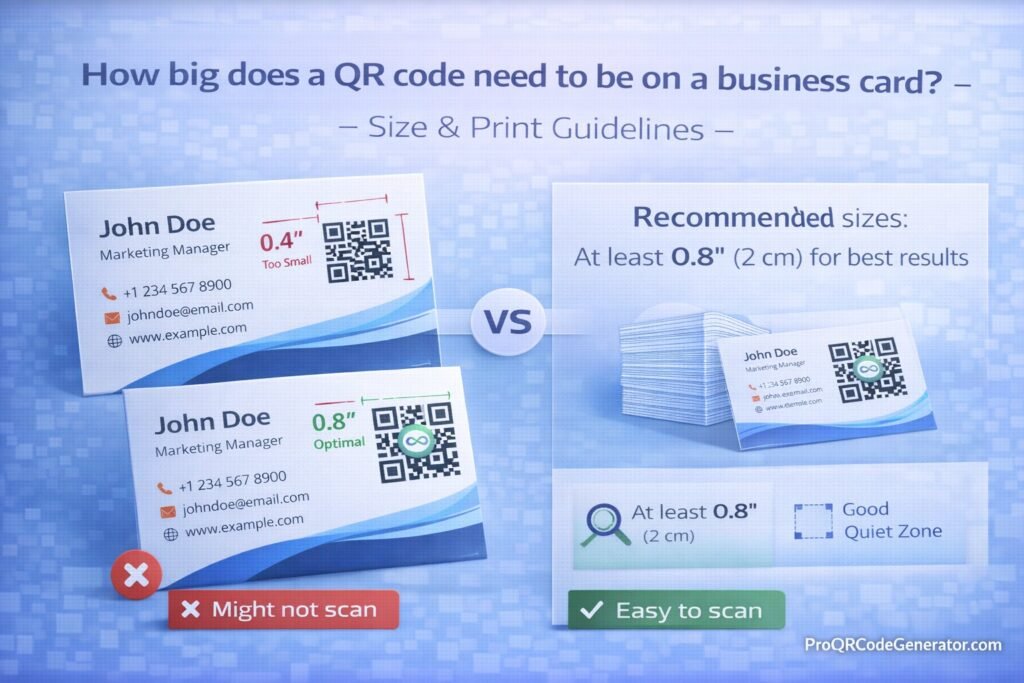
The absolute minimum size for a QR code on a standard business card is 0.8 x 0.8 inches (2 x 2 centimeters). However, this is not a blanket rule. This 0.8-inch baseline assumes you are using a clean, dynamic QR code with a minimal data matrix, printed in high contrast, with adequate margins. If you violate any of those secondary conditions, the 0.8-inch code will fail to scan.
The Scanning Distance to Size Ratio (The 10:1 Rule)
While business cards are typically held in the hand, understanding the mathematical formula behind QR scanning is vital for all print collateral. The scannability of a QR code operates on a 10:1 scanning distance-to-size ratio.
- The Formula:
Scanning Distance / 10 = Minimum QR Code Size - The Business Card Application: If a person holds a business card 8 inches away from their smartphone camera lens, the QR code must be at least 0.8 inches wide to be easily decoded by the device’s optical sensors.
If you shrink the code to 0.5 inches to save space, the user will be forced to bring their phone 5 inches away from the card. At this close range, many smartphone cameras (especially older models without dedicated macro lenses) will fail to achieve auto-focus, resulting in a blurry, unreadable image.
How QR Code Scanning Actually Works (Optical Physics)
To fully grasp how big does a QR code need to be on a business card, you must understand what the smartphone camera is actually doing when it “looks” at your card.
1. Locating the Finder Patterns
The smartphone camera’s software first searches for the three large squares located in the corners of the QR code, known as the Finder Patterns. These squares tell the scanning algorithm where the code is, how large it is, and its orientation (whether it is upside down or sideways). If the code is printed smaller than 0.8 inches, the pixel density of the camera sensor may not be able to clearly distinguish the inner squares of these finder patterns from the outer borders.
2. Evaluating the Alignment Patterns
For slightly larger codes, a smaller fourth square—the Alignment Pattern—helps the camera read the code even if the paper is bent or angled. On a small business card, a slight curve of the paper combined with a micro-sized code will distort the matrix geometry beyond the scanner’s recognition threshold.
3. Decoding the Modules
The black and white dots inside the QR code are called “modules.” The camera evaluates the luminance (light vs. dark) of each individual module to translate them back into binary data. If you print a highly dense code at a small size, these modules become so microscopic that minor ink bleeding during the printing process will cause the black modules to bleed into the white modules. The camera will see a gray blur instead of a crisp data point.
Static vs. Dynamic QR Codes: The Hidden Sizing Factor
The most common reason a 0.8-inch QR code fails to scan on a business card is the misuse of static data architecture. The underlying technology you choose directly dictates the physical size requirements of your print.
Why Static Codes Require More Space
A static QR code hardcodes your raw data directly into the visual pattern. If you create a static vCard containing your First Name, Last Name, Company, Title, Phone Number, Email, Website, and LinkedIn URL, you are encoding hundreds of characters.
- The Result: The QR code must generate a massive grid of tiny data modules to store all that text.
- The Print Issue: Because the modules are incredibly dense and tiny, you cannot print this code at the 0.8-inch minimum. The ink will bleed. To make a dense static vCard scannable, you often have to print it at 1.2 or 1.5 inches, completely monopolizing the design of your business card.
How Dynamic Codes Keep Your Matrix Clean
Enterprise professionals solve this by using dynamic QR codes. A dynamic code does not store your contact data; it only stores a short redirection URL (e.g., qr.domain.com/abc).
- The Mechanism: When scanned, the short URL routes the user to a mobile-optimized digital profile hosted in the cloud, where they can download your vCard.
- The Print Advantage: Because the code only holds a 15-character short link, the data matrix remains incredibly simple, sparse, and clean. The “dots” are larger and more clearly defined.
- The Solution: This low-density pattern allows you to comfortably print the dynamic code at the absolute minimum 0.8 x 0.8 inches without any risk of ink bleeding or scanning failure.
(To ensure your data matrix remains clean and printable at minimal sizes, generate your professional dynamic vCards using the routing architecture at ProQRCodeGenerator.com.)
The Role of Error Correction Levels in Print Sizing
When asking how big does a QR code need to be on a business card, you must factor in the “Error Correction Level” (ECL). QR codes utilize the Reed-Solomon error correction algorithm, which adds backup data to the code so it can still be read if it is damaged, scratched, or partially obscured.
There are four levels of error correction:
- Level L (Low): Restores 7% of damaged data. (Lowest visual density).
- Level M (Medium): Restores 15% of damaged data.
- Level Q (Quartile): Restores 25% of damaged data.
- Level H (High): Restores 30% of damaged data. (Highest visual density).
The Business Card Application:
Many people set their code to Level H to be “safe.” However, Level H adds massive amounts of backup data to the pattern, making the code extremely dense. If you combine a dense Level H code with the minimum 0.8-inch print size, you risk a failed scan.
For business cards—which are generally kept safe in wallets or cardholders—Level M (15%) is the optimal setting. It provides enough durability to survive a minor scratch while keeping the visual pattern simple enough to be printed beautifully at small sizes.
Business Applications: Sizing for Different Card Types
The standard American business card is 3.5 x 2 inches, but modern networking has introduced various form factors. Your sizing strategy must adapt to the canvas.
Standard 3.5″ x 2″ Cards
- Recommended Size: 0.8″ to 1.0″ square.
- Placement: The most professional execution is to place your standard contact text (Name, Title, Logo) on the front of the card, and dedicate the back of the card to a centered 1-inch QR code paired with a clear Call to Action (e.g., “Scan to Save Contact”). This keeps the front minimalist while dedicating ample space for the scanner on the back.
Square and Mini Cards (2″ x 2″ or 2.75″ x 1.1″)
- Recommended Size: 0.8″ square.
- Placement: On a 2×2 square card, space is at a premium. The QR code will be the dominant visual element. You must use a dynamic short-link code to keep the pattern clean, as the margins around the code will be exceptionally tight.
Digital NFC Hybrid Cards
- Recommended Size: 1.0″ to 1.2″ square.
- Placement: Many modern executives use a single plastic or metal NFC (Near Field Communication) card. If the prospect’s phone doesn’t have NFC enabled, the printed QR code acts as the visual fallback. Because this is a single card designed to last years, it is usually printed larger (1.2 inches) to guarantee an instant, frictionless scan in high-pressure networking environments.
Real-World Industry Examples
How do different sectors handle the question of how big does a QR code need to be on a business card based on their unique networking environments?
Real Estate Agents: Balancing Visuals and Function
Real estate is a highly visual industry. Agents often want large headshots and property imagery on their cards. A common mistake is shrinking a static vCard code down to 0.5 inches to fit a photo, resulting in a dead link. Top-performing brokers use dynamic links printed exactly at 0.8 inches on the back, leaving the front entirely for branding. When scanned, the dynamic link routes to a rich digital profile featuring all their active listings.
Enterprise Tech Sales: The Trade Show Environment
Tech sales professionals often hand out cards in dimly lit convention centers and crowded trade show floors. In low light, a smartphone camera struggles to focus on small details. Therefore, enterprise sales teams rarely print their codes at the 0.8-inch minimum. They standardly increase the size to 1.25 inches to ensure the camera achieves an instant, reliable lock in sub-optimal lighting conditions, prioritizing speed and frictionless data transfer over minimalist design.
Step-by-Step Guide: Designing and Sizing Your Code for Print
To prevent an expensive reprint of thousands of networking cards, follow this precise deployment checklist.
1. Generate a Dynamic Link
Never use a static vCard for professional printing. Use a business-grade platform to generate a dynamic vCard Plus profile. This ensures your pattern remains clean and your data remains editable long after the ink dries.
2. Set the Right Error Correction
In your generator settings, select Level M (15%) error correction. This is the optimal balance between visual simplicity and structural durability for wallet-sized prints.
3. Embed Your Brand (Carefully)
You can embed your company logo in the center of the QR code. However, the logo removes data modules from the center. Ensure the logo covers no more than 20% of the total surface area of the matrix, or you risk breaking the scanner’s ability to decode the link.
4. Export as Vector (SVG/EPS)
This is a critical step. Do not download your code as a PNG or JPG. Raster images (pixels) blur when scaled or sent to a commercial printing press. You must export the file as an SVG, EPS, or PDF vector graphic. Vector lines remain razor-sharp, maintaining the perfect contrast required by optical scanners.
(Need high-fidelity vector exports? ProQRCodeGenerator.com provides unlimited SVG and EPS downloads specifically optimized for commercial printing presses.)
5. CMYK vs RGB Printing
Your computer screen displays colors in RGB, but printers use CMYK ink. If you design a custom-colored QR code, ensure your design software (like Adobe Illustrator) is set to the CMYK color space. A color shift during the printing process could drastically reduce the contrast of your code, making it unreadable.
Comparison Table: Sizing Guidelines by Print Asset
To contextualize the business card requirements, here is how the sizing scales across standard corporate print assets.
| Print Asset | Minimum Recommended Size | Primary Scanning Distance | Data Architecture Recommendation |
| Business Card | 0.8 x 0.8 inches (2 x 2 cm) | 5 – 10 inches | Dynamic vCard Plus |
| Product Packaging | 1.0 x 1.0 inches (2.5 x 2.5 cm) | 10 – 15 inches | Dynamic PDF / URL |
| Direct Mail / Flyer | 1.5 x 1.5 inches (3.8 x 3.8 cm) | 15 – 20 inches | Dynamic Landing Page |
| Event Poster | 4.0 x 4.0 inches (10 x 10 cm) | 3 – 5 feet | Dynamic Event Registration |
| Billboard | 30 x 30 inches+ (76 x 76 cm+) | 25+ feet | Dynamic URL (Max Contrast) |
Analytics & Tracking: The Value Behind the Scan
When you figure out exactly how big does a QR code need to be on a business card and achieve the perfect print, you unlock a powerful capability: physical attribution data.
If you hand out 500 traditional business cards at a convention, you have no idea how many were kept, read, or thrown away. When you utilize a perfectly sized dynamic QR code, you transform your card into a trackable asset.
Professional dashboards provide granular insights:
- Total Scans vs. Unique Scans: Did 50 different people scan your card, or did one highly interested prospect scan it 50 times?
- Device Operating Systems: Knowing if your prospects are predominantly using iOS or Android can help tailor your digital profile experience.
- Time and Date Stamping: If you notice a spike in scans on the Tuesday following a weekend trade show, you can accurately time your follow-up email sequences to strike when engagement is highest.
The ROI of Getting Your Print Specs Right
Executives often ask if obsessing over millimeter-perfect sizing is necessary. The Return on Investment (ROI) is calculated purely in risk mitigation and conversion friction.
The Cost of Failure:
A company orders 10,000 premium, foil-stamped business cards for its global sales team at a cost of $5,000. The designer, wanting to be aesthetic, shrinks a dense static QR code to 0.6 inches. The cards are distributed. Prospects try to scan them, fail, and assume the company’s tech is broken.
- Financial Loss: $5,000 in sunk print costs.
- Opportunity Cost: Hundreds of lost contacts and potential enterprise contracts due to friction.
The Professional Approach:
By adhering to the 0.8-inch rule, using dynamic vector graphics, and validating the CMYK contrast, the cards scan in under a second. The prospect’s CRM is instantly populated with the sales rep’s data. The frictionless experience projects absolute professional competence, paying for the printing run through the acquisition of a single new client.
Top Sizing and Printing Mistakes to Avoid
Even if you know exactly how big does a QR code need to be on a business card, adjacent design errors can render the perfect size irrelevant. Avoid these catastrophic mistakes:
1. The Quiet Zone Violation
A QR code requires a mandatory border of negative space around its perimeter known as the “Quiet Zone.” This boundary must be at least four data modules wide. If you print a 0.8-inch code but place a graphic, a border, or text directly against its edge, the smartphone camera cannot differentiate the code from the background design, resulting in a dead scan.
2. Poor Contrast and Material Glare
A camera reads the difference between dark modules and light backgrounds.
- The Contrast Mistake: Printing a light gray QR code on a white card. The code must be significantly darker than the background.
- The Material Mistake: Printing on high-gloss, UV-coated paper. Glossy finishes act like mirrors. When overhead lights hit the business card, the glare completely blinds the camera lens. Always print QR business cards on matte, soft-touch, or uncoated stock.
3. Distorting the Aspect Ratio
A QR code must remain a perfect square (1:1 ratio). If a graphic designer manually stretches the code horizontally to fit a specific layout space, turning it into a rectangle, the finder patterns distort, and the code becomes mathematically unreadable.
Optimization Tips for Maximum Scan-Through Rates
To ensure your perfectly sized networking asset actually gets used, integrate conversion psychology into the physical design.
- Implement a Micro-CTA: Do not leave the code floating without context. Frame the 0.8-inch square with a directive call-to-action (CTA). Text such as “Point Camera Here to Save Contact” or “Scan for Digital Portfolio” drastically increases engagement rates by telling the user exactly what value they receive by scanning.
- Include a Fallback URL: For the rare instance where a user has a broken camera lens, always print a human-readable, custom short-link beneath the code (e.g.,
link.company.com/john-doe). - A/B Test Your Sizing: Before authorizing a mass print run for an entire corporation, print two sample batches. Print Batch A at 0.8 inches and Batch B at 1.0 inch. Distribute them internally and test scanning speeds across various office lighting conditions to find the optimal size for your specific brand colors.
Security Considerations for Corporate QR Deployments
As QR codes become standard on business cards, corporate IT and security teams must be involved in the deployment process.
- Preventing Link Rot and Domain Hijacking: If you print thousands of cards using a custom short URL that you forget to renew, a bad actor can purchase that expired domain and redirect all your employee business cards to a malicious phishing site. Always manage your routing links centrally.
- Data Privacy (GDPR/CCPA): When utilizing dynamic tracking to capture scan analytics, ensure your SaaS provider aggregates the data securely without capturing personally identifiable information (PII) without explicit user consent.
- SOC2 Compliance: For enterprise deployments, the platform managing your business card routing links should offer Single Sign-On (SSO) and role-based access control, ensuring that only authorized administrators can alter the destination of an executive’s digital profile.
Frequently Asked Questions (FAQ)
How big does a QR code need to be on a business card?
The industry standard minimum size is 0.8 x 0.8 inches (2 x 2 cm). Printing any smaller significantly increases the risk that standard smartphone cameras will fail to focus on the data matrix.
Can I make my QR code smaller than 0.8 inches?
It is highly discouraged. While a brand new flagship smartphone with a dedicated macro lens might read a 0.5-inch code under perfect lighting, you must design for the average user. A 0.8-inch minimum ensures backward compatibility with older devices.
Why is my printed QR code blurry and unscannable?
You likely downloaded the code as a low-resolution PNG or JPG file. For commercial printing, you must export your QR code as a Vector graphic (SVG or EPS) so the edges remain razor-sharp at any size.
Should I put the QR code on the front or back of my business card?
Best practice dictates placing traditional contact info on the front and dedicating the back to a 1.0-inch QR code paired with a clear Call to Action. This prevents visual clutter.
What happens if I need to update my phone number after printing?
If you used a Static QR code, you must throw away the cards and reprint them. If you generated a Dynamic QR code, you simply log into your software dashboard and update the number; the physical printed cards will instantly route to the new information.
Does the color of the business card matter for scanning?
Yes. You must maintain high optical contrast. The QR code data pattern must be significantly darker than the background of the card. Furthermore, avoid high-gloss paper, as light glare will blind the smartphone scanner.
Conclusion: Bridging the Physical and Digital Divide
The business card remains a staple of professional introductions, but its utility has fundamentally shifted. It is no longer just a piece of paper; it is the physical gateway to your digital identity.
When answering how big does a QR code need to be on a business card, the baseline of 0.8 inches is just the beginning of the conversation. True professional execution requires a holistic understanding of optical physics, data architecture, error correction, and commercial print standards. By utilizing vector graphics, avoiding dense static matrices, ensuring high contrast, and respecting the quiet zone, you guarantee that your introduction is frictionless.
Most importantly, decoupling your physical print from your digital data by using dynamic routing architecture ensures your networking assets never expire, providing a massive return on your printing investment.

