
Table of Contents
In the highly competitive hospitality industry, operational efficiency and profit margins are inextricably linked. For decades, the physical restaurant menu was a rigid, costly liability. A sudden spike in the cost of a core ingredient, a newly introduced seasonal dish, or a simple typographical error meant one thing: scrapping your current menus and paying a commercial printer for a rush replacement job.
When the industry rapidly adopted digital, contactless ordering, restaurateurs assumed the days of printing costs were over. However, many quickly fell into a new technological trap. By utilizing free, static QR generators, they locked their physical table tents to a single, unchangeable web address. When the URL changed or the PDF needed updating, the physical codes broke, resulting in frustrated diners and lost revenue.
Today, savvy operators are abandoning static codes. If you are a general manager, owner, or marketing director asking how to update restaurant menu QR code without reprinting, the definitive answer lies in adopting dynamic routing architecture.
This comprehensive guide will break down the exact technical mechanisms that allow for infinite digital menu updates, explore the operational benefits of agile menu management, and provide a step-by-step roadmap to future-proofing your restaurant’s tables.
What It Is: The Dynamic QR Code Solution
To understand how you can change your digital offerings without replacing your physical table assets, you must first understand the structural difference between the two primary types of two-dimensional barcodes: Static and Dynamic.
The Limitation of Static QR Codes
A static QR code permanently encodes your exact website URL or PDF file path directly into the visual matrix of black and white squares.
Because the data is hard-coded into the image itself, it is mathematically impossible to change the destination without changing the physical pattern. If you printed 500 table placards featuring a static code pointing to www.yourbistro.com/spring-menu.pdf, and you suddenly need to switch to the summer-menu.pdf, those 500 placards instantly become useless. The link is broken, and a complete reprint is required.
The Power of Dynamic QR Codes
A dynamic QR code solves this problem by utilizing an intermediary step. Instead of encoding your final menu link into the pattern, a dynamic code encodes a secure, permanent “short URL” (for example, qr.yourbistro.com/table1).
This short URL acts as a digital traffic cop. When a guest scans the code, they are briefly routed to a management server, which instantly redirects them to whatever final destination you have currently specified. Because the physical printed pattern only points to the routing server, you can log into a dashboard and change the final destination URL an infinite number of times. The physical printed code remains exactly the same.
How It Works: The Mechanics of Server-Side Redirection
For restaurateurs transitioning into digital marketing and operational tech, understanding the backend process of this technology is crucial. When a guest sits at your table and scans your dynamic code, a highly sophisticated sequence occurs in roughly 150 to 300 milliseconds.
- The Scan: The guest’s smartphone camera decodes the matrix and opens the mobile browser, pinging the short routing URL.
- The DNS Lookup: The browser locates the IP address of the routing server hosted by your QR platform.
- Data Capture (Analytics): The routing server receives the request. In this fraction of a second, it captures non-personally identifiable analytics, such as the timestamp, device operating system (iOS vs. Android), and general geographic location.
- The HTTP 302 Redirect: The server queries its database to see which menu link you currently have set as active. It then issues an HTTP 302 (“Temporary Redirect”) status code to the smartphone, pushing it seamlessly to your new menu.
- The Final Load: The mobile browser automatically follows the redirect and loads your target webpage or PDF.
By utilizing an enterprise-grade platform like ProQRCodeGenerator.com, this entire multi-step relay happens frictionlessly. The guest experiences zero lag, and you maintain absolute control over the destination.
Core Benefits of Editing Without Reprinting
Transitioning your restaurant to dynamic infrastructure provides immediate, measurable benefits to your bottom line and your daily operations. Learning how to update restaurant menu QR code without reprinting isn’t just a technical trick; it is an operational strategy.
1. Total Eradication of Reprinting Costs
High-quality physical assets—such as laser-engraved wooden table blocks, custom-cut acrylic stands, or waterproof metal patio plaques—are expensive to produce. Dynamic codes allow you to make these premium investments once. You decouple the physical hardware of your restaurant from the digital software of your menu.
2. Immediate Correction of Errors
Human error happens. If your designer misspelled “Vinaigrette” or listed a $40 steak for $4.00, discovering the error after the lunch rush has started is a nightmare. With dynamic architecture, the floor manager simply logs into the backend from their office computer or smartphone, updates the link or PDF, and the error is corrected globally in seconds.
3. Supply Chain Agility and “86’ing”
Global supply chains for fresh ingredients are volatile. If your fish supplier fails to deliver the sea bass on a Friday afternoon, your servers shouldn’t have to spend the entire evening apologizing to guests that the featured item is “86’d” (out of stock). With dynamic routing, you can instantly swap the menu to a version that removes the sea bass, preserving the guest experience and maintaining the integrity of your brand.
Business Applications for Agile Menus
How do top-tier hospitality groups leverage dynamic menu routing? They use it to implement advanced, data-driven revenue strategies.
Automated Dayparting
Many restaurants serve distinct menus for breakfast, lunch, dinner, and late-night service. Instead of requiring the host stand to walk around the restaurant swapping out physical menus four times a day, dynamic codes simplify the transition. At 11:00 AM, the manager logs into the platform and changes the QR code destination from the breakfast menu URL to the lunch menu URL. Every table in the restaurant is instantly updated.
Dynamic Pricing Strategies
In an era of fluctuating food costs, static pricing is dangerous. Dynamic digital menus allow operators to adjust prices incrementally based on market costs without the friction of physically re-stickering menus. If the cost of avocados spikes, you can adjust your guacamole pricing on your digital menu in real-time to protect your food cost margins.
A/B Testing Promotions
If your restaurant is running a special promotion, you can use dynamic routing to test how you present it. For the first week of the month, the QR code routes to a menu that features a “Happy Hour App Combo” at the top of the page. For the second week, you change the destination to a menu that features a “Half-Price Wine” special. By reviewing your sales data, you can definitively measure which digital presentation drove higher check averages.
Real-World Industry Examples
To truly conceptualize the value of this technology, consider how different sectors of the hospitality industry apply dynamic menu updates.
- The Multi-Tap Craft Brewery: A bustling brewery with 40 rotating taps changes its draft list daily as kegs blow. Using a dynamic code painted directly onto the wall murals and printed on coasters, the taproom manager simply updates a digital Google Sheet or PDF every time a new keg is tapped. Customers always see a real-time, 100% accurate draft list.
- The High-End Resort: A sprawling beach resort places customized, weather-proof QR codes on every poolside cabana. Depending on the weather or the time of day, the Food & Beverage Director changes the routing. On a scorching afternoon, the code links to frozen cocktails and light salads. As the sun sets, the link is dynamically updated to show heavy appetizers and evening wine specials.
- The Quick Service Restaurant (QSR): A local drive-thru chain places a large QR code on their exterior menu board. During the morning rush, the code routes to a fast-loading, mobile-optimized coffee and breakfast sandwich menu. By 10:30 AM, the destination is swapped to the lunch combos, keeping the drive-thru line moving efficiently.
Step-by-Step Guide: How to Update Restaurant Menu QR Code Without Reprinting
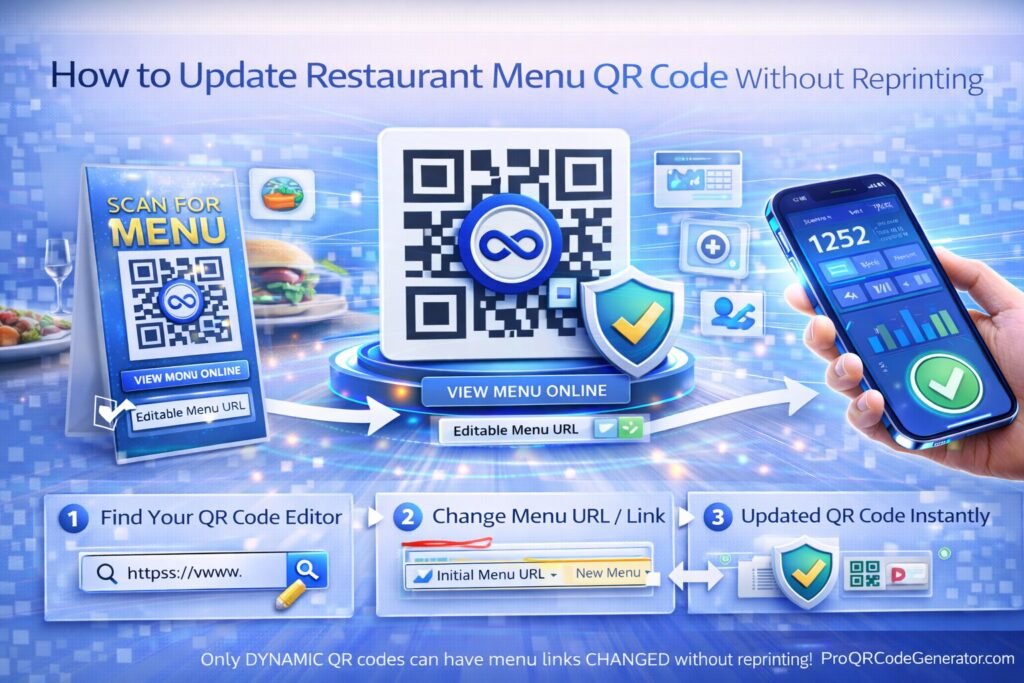
If you are currently locked into a static system, you must migrate to a professional dynamic platform. Here is the exact, step-by-step process for deploying and updating a dynamic menu.
Phase 1: Initial Setup
- Choose a Professional Platform: Select a business-grade software like ProQRCodeGenerator.com that specializes in dynamic routing and high-uptime server stability.
- Create Your Digital Asset: Prepare your digital menu. This can be a mobile-optimized PDF file, an image file (JPEG/PNG), or a dedicated page on your restaurant’s website (e.g.,
yourrestaurant.com/live-menu). - Generate the Dynamic Code: Inside your dashboard, select the option to create a “Dynamic” or “Trackable” code. Input your current menu link or upload your PDF.
- Customize and Print: Add your restaurant’s logo to the center of the code, match the pattern to your brand colors, download the high-resolution vector file (SVG or EPS), and send it to your commercial printer for your table inserts.
Phase 2: Updating the Menu (Post-Printing)
Let’s assume three months have passed, and you need to launch your Autumn menu.
- Prepare the New Asset: Create your new Autumn menu PDF or publish the new webpage.
- Log into Your Dashboard: Access your QR management account.
- Locate the Campaign: Find the specific QR code labeled “Main Dining Room Tables.”
- Execute the Swap: Click “Edit Destination.” Delete the old Summer menu URL or PDF file, and paste the new Autumn URL (or upload the new Autumn PDF).
- Save and Test: Click “Save Changes.” Open your smartphone camera, point it at one of the physical placards sitting on your tables, and verify that the new Autumn menu loads instantly.
You have just updated your entire restaurant without spending a single dollar on printing.
Static vs. Dynamic Menus: A Technical Comparison
To ensure you make the correct infrastructural choice for your restaurant, review this direct capability comparison.
| Capability / Feature | Free Static QR Code | Dynamic SaaS Platform |
| How to update without reprinting? | Impossible. Must reprint. | Instant via dashboard login. |
| Correction of Typos | Requires total replacement. | 10-second server update. |
| Scan Analytics & Data | None. Completely blind. | Full location, time, and device tracking. |
| A/B Testing Menus | Impossible. | Easy via URL swapping. |
| Scan Reliability & Speed | Degrades if URL is too long. | High speed, simple matrix pattern. |
Analytics & Tracking: Beyond the Menu Update
When you utilize dynamic architecture to solve the problem of how to update restaurant menu QR code without reprinting, you inadvertently unlock one of the most powerful tools in modern marketing: scan analytics.
Because dynamic codes route traffic through a central server, platforms can capture rich, actionable data about your guests’ behavior.
Tracking Peak Scan Times
Your dashboard will reveal a timeline of scan frequency. While you may intuitively know when your restaurant is “busy,” scan data shows you exactly when guests are ready to order. If your dining room fills up at 6:00 PM, but peak scan time doesn’t hit until 6:25 PM, you may have a bottleneck at the host stand or the bar that is delaying seating and turning tables.
Understanding Device Demographics
Are your customers using iOS (Apple) or Android devices? If your analytics show that 90% of your scans come from iPhones, you must rigorously QA test your digital menus in the Safari browser. Ensuring a frictionless user experience on the dominant device in your dining room directly impacts conversion rates (ordering).
Utilizing UTM Parameters for Table Tracking
Advanced operators will create a unique dynamic code for each specific table (Table 1, Table 2, Table 3, etc.). By appending UTM tracking parameters to the destination URLs (e.g., menu.com/?utm_source=qr&utm_medium=table_12), the restaurant can use Google Analytics to see exactly which areas of the restaurant yield the highest digital engagement.
ROI Discussion: The True Cost of Reprinting vs. Subscribing
Many independent operators hesitate to pay a monthly subscription for QR software, assuming that “free” static generators save them money. A basic financial analysis proves this is a fallacy.
The Cost of Rigid Print:
Imagine a mid-sized restaurant with 40 tables. They use premium, laminated inserts that cost $3.00 each to print and ship.
- Initial print: $120.
- They change their menu seasonally (4 times a year): $480.
- They make two pricing errors a year requiring emergency reprints: $240.Total Annual Cost: $840 (plus the labor hours spent physically swapping the paper).
The ROI of Dynamic Infrastructure:
A professional platform might cost $15 to $30 a month.
- Annual Subscription: ~$240.
- Initial Print of Dynamic Codes: $120.
- Subsequent menu updates, error corrections, and daily dayparting: $0.Total Annual Cost: ~$360.
In this standard scenario, deploying dynamic codes saves the restaurant $480 in pure cash, eliminates hours of operational friction, and provides invaluable data analytics that the “free” static option completely lacks.
Mistakes to Avoid When Updating Digital Menus
The ability to update your menu on the fly is powerful, but it must be executed correctly to maintain a premium guest experience. Avoid these common digital menu pitfalls:
1. Uploading Massive Desktop PDFs
When you change your destination link, ensure the new file is optimized for mobile. Do not upload a 25MB print-ready PDF file that was designed for a 11×17 inch physical menu. When a guest on a 4G cellular connection tries to scan and download a massive file, the page will time out, and they will abandon the scan. Compress your PDFs to under 2MB.
2. Ignoring Mobile Formatting (The “Pinch and Zoom” Trap)
If your digital menu requires the guest to constantly pinch, zoom, and scroll horizontally to read the prices, you are creating a hostile user experience. When updating your menu, consider switching from a PDF to a responsive HTML webpage that stacks the menu items vertically, allowing for easy, one-handed scrolling.
3. Breaking the Tracking Chain
If you use Google Analytics and UTM parameters to track your menu performance, remember to append those UTM tags to your new destination URL before you swap it in your QR dashboard. If you paste a “naked” URL, you will lose your attribution data, and all your table scans will suddenly show up in Analytics as generic “Direct” traffic.
Optimization Tips for Digital Restaurant Menus
To maximize the scan rate of your table codes and the average check size of your digital menu, integrate these optimization strategies.
Add a Clear Call-to-Action (CTA)
A bare QR code floating in the middle of a table tent is easily ignored. Enclose your code in a stylized frame that tells the guest exactly what to expect. Use active language such as:
- “Scan here for our digital menu and daily specials.”
- “Hungry? Scan to view our menu and order instantly.”
- “Scan for our sommelier’s weekly wine pairings.”
Brand Your Matrix
Do not settle for generic black-and-white static patterns. Use your platform’s design suite to integrate your restaurant’s visual identity. Change the color of the matrix to your brand’s primary hex code, soften the edges of the data squares, and upload your restaurant’s logo directly into the center of the code. A branded code looks professional, safe, and trustworthy.
With a solution like ProQRCodeGenerator.com, adding your custom branding and compelling CTA frames takes only a few clicks, ensuring your table assets match your interior decor perfectly.
Security Considerations for Digital Menus
As digital ordering becomes ubiquitous, security threats have evolved. The most prominent threat to restaurants using QR codes is “Quishing” (QR Phishing).
What is Quishing?
Quishing occurs when a malicious actor prints their own static QR codes on sticker paper. They visit your restaurant, sit at a table, and secretly place their fake sticker directly over your legitimate QR code. When the next guest scans the table, they are routed to a fake website designed to look exactly like your restaurant’s ordering page, where the hacker attempts to steal the guest’s credit card information.
How to Prevent Tampering
Because you now know how to update restaurant menu QR code without reprinting, you no longer need your codes printed on cheap, easily covered paper.
To secure your tables:
- Engrave the Codes: Laser-engrave your dynamic codes directly into wooden table-top blocks or metal plaques. A sticker placed over an engraving is immediately obvious to staff and guests.
- Under-Glass Printing: Print the codes and seal them beneath the acrylic or glass top of the table.
- Use Secure Hosting: Ensure your dynamic QR provider utilizes enterprise-grade SSL/TLS encryption for all their routing URLs (HTTPS). This prevents digital “man-in-the-middle” attacks when guests are connected to your public Wi-Fi.
Frequently Asked Questions (FAQ)
How to update restaurant menu QR code without reprinting?
You must originally generate a Dynamic QR code. Dynamic codes link to a backend routing server. By logging into your QR management dashboard, you can replace the old menu URL or PDF file with the new one. The printed code automatically redirects to the new content instantly.
Can I change a static QR code to a dynamic one?
No. The visual pattern of a static code is mathematically locked to its destination. You cannot “upgrade” a physical static code. You must generate a new dynamic code, print it once, and then you will have infinite editing capabilities moving forward.
How much does it cost to update a dynamic menu code?
Once you have an active subscription with a SaaS platform, changing the destination URL or uploading a new menu PDF is completely free and included in your plan. You can update it 100 times a day at no extra cost.
Does changing the menu URL erase my past scan analytics?
No. Professional tracking platforms tie your scan analytics to the short routing URL, not the final destination. Your historical scan data (timestamps, locations, devices) remains perfectly intact and continuous even after you update the target menu.
Can I link my QR code to a PDF instead of a website?
Yes. Most dynamic platforms allow you to directly upload a PDF file to their servers. When guests scan the code, the PDF menu opens instantly in their mobile browser.
What happens to my menus if I cancel my QR subscription?
Dynamic QR codes require an active server to execute the redirect. If you cancel your subscription with your software provider, the routing server is deactivated, and your printed QR codes will break and return an error message to the guest.
Can I use a free QR generator for my restaurant?
It is highly discouraged. Free generators almost exclusively create static, uneditable codes. Furthermore, many “free” dynamic trials will unexpectedly expire or inject unwanted, unskippable advertisements before displaying your menu, ruining the guest experience.
Do dynamic QR codes scan faster than static ones?
Yes. Static codes become denser and more complex as the destination URL gets longer, making them harder for older smartphone cameras to read. Dynamic codes only encode a very short URL, keeping the matrix simple, clean, and lightning-fast to scan.
Conclusion: Future-Proofing Your Tables
The era of the static, inflexible dining room is over. When hospitality leaders ask how to update restaurant menu QR code without reprinting, they are fundamentally seeking a way to regain control over their operations, their margins, and their customer experience.
By avoiding the trap of free, static generation and embracing dynamic, server-routed architecture, you transform every table in your restaurant into an agile digital touchpoint. You protect your budget from the relentless cycle of commercial reprinting. You empower your floor managers to fix pricing errors and 86 items in real-time. Most importantly, you gain access to the behavioral scan data necessary to engineer a more profitable menu.
Do not let a static piece of paper dictate the speed at which your restaurant operates. Take total control of your offline-to-online guest journey.

