
Table of Contents
In the fast-paced world of digital marketing, agility is the ultimate competitive advantage. For years, the bridge between physical advertising and digital conversion was static: once a flyer was printed or a billboard was erected, the information it contained was locked in stone. If a URL changed, a promotion ended early, or a simple typo was discovered after a 10,000-unit print run, the result was a catastrophic marketing failure and a total loss of ROI.
The introduction of dynamic technology has fundamentally altered this landscape. Understanding how to change link inside a qr code is no longer just a technical troubleshooting skill; it is a core operational requirement for any business that values efficiency and accuracy. By utilizing a dynamic architecture, you can decouple your physical assets from your digital destinations, ensuring that your marketing remains accurate, relevant, and trackable—long after the ink has dried.
This guide provides a deep dive into the mechanics of editable QR codes, the step-by-step process of updating your destinations, and the strategic reasons why top-tier brands rely on dynamic redirection to protect their marketing investments.
The Problem: Why Most QR Codes Break After Printing
The most common frustration in QR marketing occurs when a user scans a code only to be met with a “404 Not Found” error or an expired landing page. This happens because the creator unknowingly used a “Static” QR code.
Static vs. Dynamic: The Technical Divide
A Static QR Code encodes the destination data directly into the visual pattern of squares (the matrix). Because the URL is part of the image itself, it is permanent. If you need to change the destination, you must generate a brand-new image, which means you must also reprint all of your physical materials.
A Dynamic QR Code, by contrast, does not encode the final destination. Instead, it encodes a unique, secure “Short URL” that acts as a placeholder. When a user scans the code, they are briefly routed to a management server, which then looks up the current destination assigned to that code and redirects the user accordingly.
The Financial Cost of a Broken QR Code
Imagine a luxury real estate agency that prints 5,000 high-end brochures for a new development. If the listing URL changes or the property is sold and they need to redirect traffic to a new listing, a static code would render those brochures worthless. The cost of reprinting, re-shipping, and re-distributing that collateral can reach thousands of dollars. Learning how to change link inside a qr code using dynamic technology eliminates this financial risk entirely.
The Core Mechanism: How Dynamic Redirection Works
To master the art of editable marketing, you must understand the “Invisible Relay” that happens in the milliseconds after a scan.
Understanding the Short URL Placeholder
When you use a professional platform like ProQRCodeGenerator.com, the software generates a shortened, encrypted link that is embedded into the QR matrix. Because this link is short, the QR code image itself remains less dense and easier for older smartphone cameras to scan, even at small sizes or from a distance.
The 302 Redirect: The Secret to Instant Updates
When you update your link in the dashboard, the server executes what is known as an HTTP 302 Redirect. This is a standard web protocol that tells the user’s browser: “The resource you are looking for is temporarily located at this new address.” Because this happens on the server-side, the change is instantaneous. You can update a link in New York, and a customer scanning a code in Tokyo one second later will be directed to the new destination. This is the fundamental answer to how to change link inside a qr code without touching the physical printed asset.
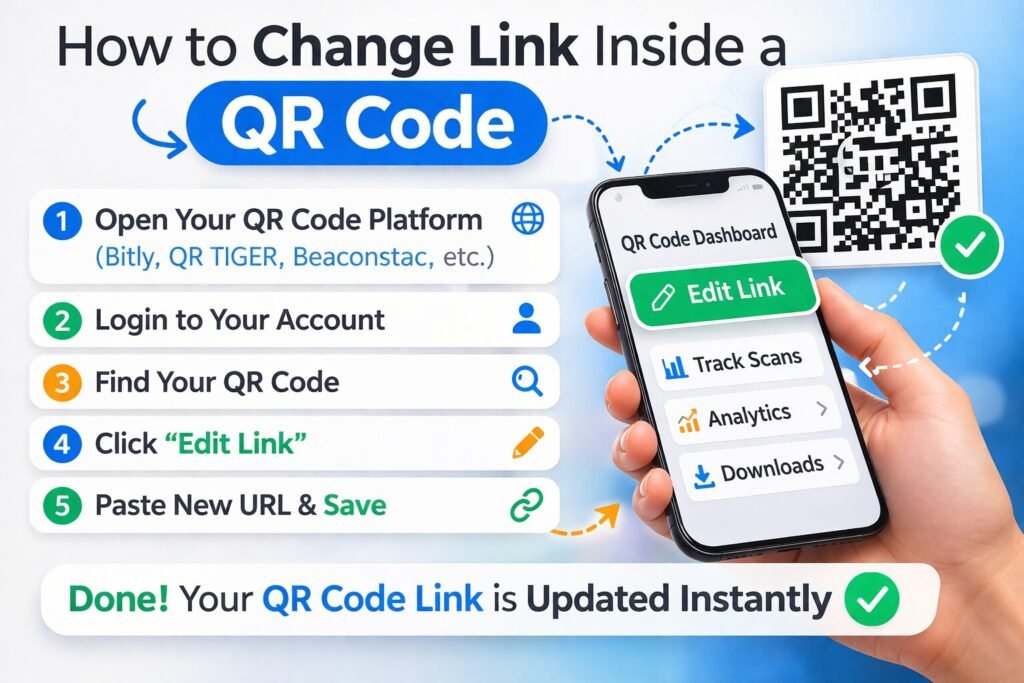
Step-by-Step: How to Change Link Inside a QR Code
If you are using a professional dynamic management system, the process of updating your marketing mid-campaign is straightforward and risk-free.
Step 1: Accessing Your Management Dashboard
Log into your account on your QR management platform. High-level SaaS solutions like ProQRCodeGenerator.com provide a centralized “Campaign Manager” where every code you have ever created is listed with its corresponding metrics.
Step 2: Selecting the Target Campaign
Locate the specific QR code that needs an update. Most professional dashboards allow you to organize codes by project name, date, or category (e.g., “Spring Sale 2026” or “Product Packaging”).
Step 3: Modifying the Destination URL
Click the “Edit” or “Change Link” button associated with that code. A field will appear containing your current destination URL. Simply delete the old link and paste the new one. This could be a new website, a PDF download, a WhatsApp chat link, or a social media profile.
Step 4: Testing the Real-Time Update
After saving your changes, always perform a “Live Test.” Take your own smartphone and scan one of your printed materials. You should be redirected to the new destination immediately. No re-printing, no stickers, and no wasted paper.
Business Applications: When Editing a Link is Critical
The ability to modify content on the fly opens up a world of strategic possibilities that go far beyond just “fixing a mistake.”
Seasonal Marketing Campaigns and Promotions
Retailers often use the same physical signage year-round. With dynamic codes, a window cling can point to the “Winter Clearance” in January and be updated to the “Spring Collection” in March without the store manager ever having to remove the decal from the glass.
Correcting Typos and 404 Errors on Large Print Runs
Even the most rigorous QA processes can miss a typo in a long URL. If you discover a broken link after your product packaging has been sent to the manufacturer, a dynamic QR code is your “Get Out of Jail Free” card. You simply fix the link in the dashboard, and the packaging remains perfect.
Inventory Management and Product Packaging Updates
If you are a manufacturer, your QR codes might link to “Instruction Manuals” or “Warranty Registration.” If the manual is updated to version 2.0, you don’t need to change your box design. You simply update the link to point to the new PDF.
Industry Examples: Real-World Scenarios
Real Estate: Updating Property Status
An agent places a “For Sale” sign in a yard with a QR code linking to the property details. Once the house goes “Under Contract,” the agent changes the link to a “Join My VIP Buyer List” form. Once the house is “Sold,” they change it again to a “Check Your Home’s Value” landing page. One sign, three different conversion goals.
Hospitality: Dynamic Menus and Daily Specials
Restaurants use a single QR code on tabletop acrylic stands. The manager updates the link every morning: at 10:00 AM it points to the Breakfast Menu; at 12:00 PM it points to the Lunch Specials; and at 5:00 PM it redirects to the Dinner and Cocktail list.
Event Management: Schedule and Speaker Changes
At a large conference, the “Event Guide” QR code is printed on every attendee’s lanyard. If a speaker cancels or a room assignment changes at the last minute, the organizer updates the digital guide. Every attendee is instantly informed of the change the next time they scan their badge.
Analytics & Tracking: What Happens After the Change?
One of the greatest benefits of knowing how to change link inside a qr code is the data that comes with it. Because the code is dynamic, it continuously tracks engagement regardless of the destination.
Comparing Performance Before and After the Update
A professional dashboard allows you to see if your new destination is converting better than the old one. If you change a “Buy Now” link to a “Get 20% Off” link, you can track the spike in scan volume and click-through rates to measure the effectiveness of the new offer.
Geolocation and Device Metrics for Optimized Routing
Dynamic codes can provide data on where your scans are coming from. If you see a high volume of scans in a specific city, you might choose to change the QR link to a localized landing page or a map pointing to the nearest physical store in that area.
ROI Discussion: Why Professional Software Pays for Itself
While free static generators are tempting, they are often a “false economy.” A professional subscription to a platform like ProQRCodeGenerator.com usually costs less than the price of a single lunch, yet it can save a business thousands in potential reprinting costs.
The ROI is calculated not just in saved paper, but in saved time and protected reputation. A broken link is a sign of an unprofessional brand. An agile, always-accurate link builds trust with your audience.
Mistakes to Avoid: Why Some Link Changes Fail
- The “Static Trap”: The most common mistake is trying to change the link on a static code. It is technically impossible. Always start with a dynamic code.
- Complex URL Errors: When updating your link, ensure the new URL includes the
https://prefix. Forgetting this can cause some older browsers to fail the redirect. - Forgetting to Test: Never assume the change worked. Always scan the physical code after updating the dashboard to confirm the destination is correct.
Security Considerations: Protecting Your Redirects
As QR codes become more prevalent, “Quishing” (QR Phishing) has become a concern. Professional platforms protect your links with SSL encryption and secure routing servers. When you update your link, ensure you are using a trusted destination to maintain the integrity of your brand and the safety of your customers’ data.
FAQ
Can I change the link on a QR code after it’s printed?
Yes, but only if you used a Dynamic QR code. Static codes cannot be changed once they are generated.
Does the QR code image change when I update the link?
No. The visual pattern remains exactly the same. The change happens on the server-side, which is why you don’t need to reprint anything.
How many times can I change the link?
With a professional service like ProQRCodeGenerator.com, you can typically change the destination URL an unlimited number of times for the life of the campaign.
How long does it take for the link to update?
The update is usually instantaneous. As soon as you hit “Save” in your dashboard, the next person to scan the code will be sent to the new URL.
Can I change a URL to a PDF download?
Yes. Dynamic codes are flexible. You can change the destination from a website to a file, a vCard, a YouTube video, or any other digital resource.
Conclusion: Making Your Marketing Agile
The ability to adapt is what separates successful marketing campaigns from forgotten ones. Knowing how to change link inside a qr code gives you the freedom to experiment, the security to fix errors, and the power to keep your physical collateral relevant for years.
Stop treating your print marketing as a static, “one-and-done” effort. By shifting to a dynamic infrastructure, you ensure that every scan provides value to your customer and data to your business.

