
Table of Contents
Event organizers constantly deal with changing information. Schedules shift, speakers change, registration pages update, and ticket links evolve. If your QR codes are printed on posters, flyers, tickets, or badges, changing those links later can become expensive and time-consuming.
This is exactly why many organizers search for how to create editable QR code for events. An editable QR code allows you to update the destination content—such as registration pages, schedules, ticket links, or event details—without changing the printed QR code itself.
Instead of reprinting thousands of materials, you simply update the link behind the QR code.
In this comprehensive guide, you’ll learn:
- What editable QR codes are and how they work
- Why event organizers use dynamic QR codes
- The difference between static and editable QR codes
- A complete step-by-step process to create one
- Tools for event QR campaigns
- Analytics and scan tracking insights
- Event marketing use cases
- Optimization and security best practices
By the end, you will know exactly how to create flexible QR codes that support modern event management and marketing.
What Is an Editable QR Code for Events?
An editable QR code for events is a dynamic QR code that allows organizers to update the content behind the QR code without changing the code image.
When someone scans the QR code, they are redirected to a link that can be modified through a dashboard.
This makes QR codes extremely useful for events because details often change.
Event QR codes commonly link to:
- registration pages
- digital tickets
- event schedules
- speaker information
- RSVP forms
- live updates
For example, an event flyer might contain a QR code linking to the event website. If the registration page changes later, the organizer can update the destination without replacing the flyer.
Why Event Organizers Use Editable QR Codes
Editable QR codes provide several advantages for event planning and marketing.
Flexibility
Event information often changes. Editable QR codes allow updates without replacing printed materials.
Reduced Printing Costs
Without editable QR codes, every link change requires new posters, tickets, and flyers.
Dynamic QR codes eliminate this cost.
Real-Time Updates
Event organizers can update:
- schedules
- speaker pages
- ticket links
- event announcements
Even after marketing materials are distributed.
Analytics Tracking
Editable QR codes typically include scan analytics.
Organizers can track:
- number of scans
- attendee engagement
- location of scans
- time of interaction
These insights help measure marketing performance.
Static vs Dynamic QR Codes for Events
To understand how editable QR codes work, it’s important to compare static and dynamic QR codes.
| Feature | Static QR Code | Editable Dynamic QR |
|---|---|---|
| Editable after creation | ❌ No | ✅ Yes |
| Editable after printing | ❌ No | ✅ Yes |
| Scan tracking | ❌ No | ✅ Yes |
| Marketing campaigns | Limited | Flexible |
Static QR Codes
Static QR codes contain the final link embedded directly inside the QR code.
Example encoded data:
https://event.com/register
If the registration page changes, the QR code becomes outdated.
Dynamic QR Codes
Dynamic QR codes use a redirect system.
Instead of storing the final destination, they store a redirect link managed by a QR platform.
Workflow:
- User scans QR code
- Scan goes to redirect server
- Scan analytics are recorded
- User is redirected to the destination
Because the final link is stored on the server, it can be edited anytime.
Platforms such as ProQRCodeGenerator.com provide dynamic QR codes that allow editing links and tracking scan analytics through a dashboard.
How Editable QR Codes Work
Editable QR codes rely on a redirect infrastructure.
Instead of encoding the final destination, the QR code encodes a short redirect URL.
Example:
qrplatform.com/abc123
When scanned:
- The redirect server receives the request
- Scan analytics are recorded
- The server redirects the user to the event page
If the organizer later changes the event link, the redirect is updated.
The QR code image remains exactly the same.
Step-by-Step: Creating an Editable QR Code for Events
Creating a dynamic QR code for an event requires only a few steps.
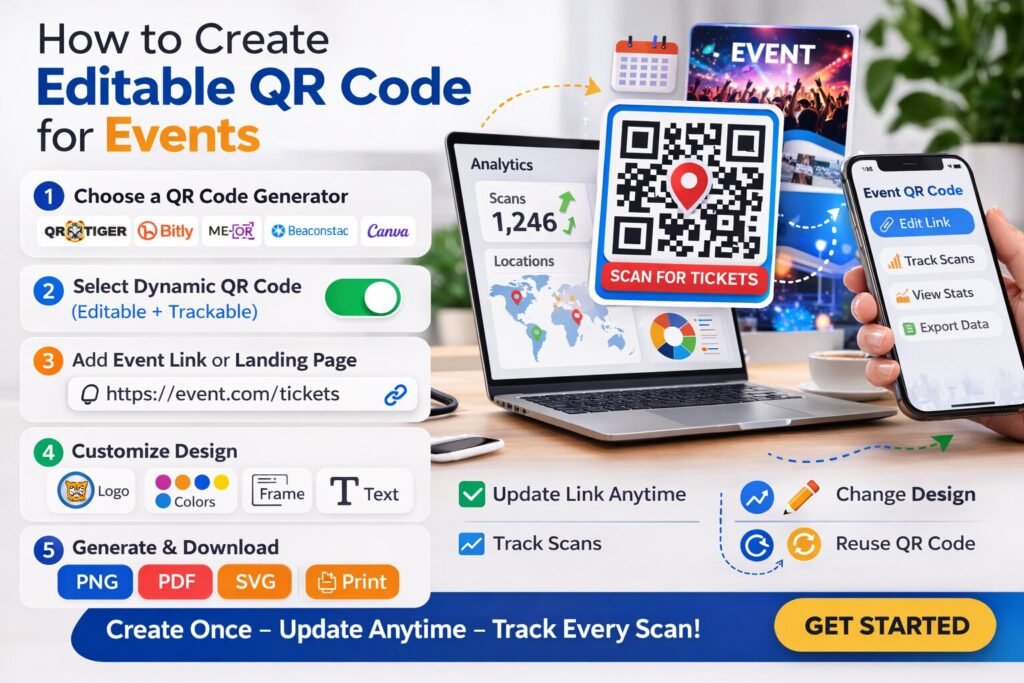
Step 1 – Prepare Your Event Link
First determine the destination for the QR code.
Common examples include:
- event registration page
- ticket purchase page
- event landing page
- digital schedule
Example:
https://eventsite.com/register
Step 2 – Choose a Dynamic QR Code Generator
Use a QR generator that supports dynamic QR codes.
Key features to look for include:
- editable links
- analytics tracking
- unlimited scans
- custom branding
Step 3 – Select the QR Code Type
Most QR platforms allow multiple QR types, including:
- URL
- WiFi
- vCard
For events, the URL QR code is most common.
Step 4 – Paste the Event Link
Paste your event URL into the generator.
The system will automatically generate the QR code preview.
Step 5 – Customize the QR Code
Event QR codes can be customized to match branding.
Customization options often include:
- brand colors
- event logo
- frames with instructions
Example call-to-action text:
- Scan to Register
- Scan for Event Schedule
- Scan for Tickets
Clear instructions increase scan rates.
Step 6 – Generate and Download the QR Code
Once customization is complete, generate the QR code.
Download it in high resolution for printing.
Recommended formats:
- PNG
- SVG
Step 7 – Track and Update the QR Code
After publishing the QR code on flyers or marketing materials, you can update the destination anytime through the dashboard.
Platforms like ProQRCodeGenerator.com allow event organizers to manage QR campaigns and update event links whenever necessary.
Best Tools for Event QR Codes
When creating editable QR codes for events, organizers should use platforms that provide professional features.
Important capabilities include:
- dynamic QR editing
- scan analytics dashboards
- custom QR branding
- unlimited scans
- campaign management
Solutions such as ProQRCodeGenerator.com combine these features, allowing organizers to create trackable QR codes and monitor engagement from event marketing campaigns.
Event Analytics and Scan Tracking
One major advantage of editable QR codes is scan analytics.
Event organizers can track:
- number of QR scans
- geographic location of scans
- device type
- time of scans
Example dashboard metrics:
| Metric | Example |
|---|---|
| Total scans | 1200 |
| Unique visitors | 850 |
| Top scan location | New York |
| Peak scan time | 7 PM |
This data helps organizers understand audience engagement.
Event Use Cases for Editable QR Codes
Editable QR codes can be used across many parts of event marketing.
Event Registration
Flyers and posters can include QR codes linking directly to registration pages.
Digital Tickets
QR codes can serve as digital tickets for event entry.
Event Schedules
Attendees can scan QR codes to access updated event schedules.
Speaker Information
QR codes on conference badges can link to speaker profiles.
Event Promotions
QR codes on social media and advertisements can drive traffic to landing pages.
ROI Benefits for Event Marketing
QR codes help event organizers measure campaign performance.
Example:
An event distributes 5,000 flyers with QR codes.
Analytics show:
- 1,200 scans
- 300 registrations
This conversion data helps measure marketing ROI.
Without QR analytics, it would be difficult to attribute registrations to specific campaigns.
Common Mistakes Event Organizers Make
Some mistakes reduce QR campaign effectiveness.
Using Static QR Codes
Static QR codes cannot be edited later.
Dynamic QR codes provide much more flexibility.
Poor QR Code Placement
QR codes should be placed where attendees can easily scan them.
No Instructions
Always include a call-to-action.
Example:
Scan to Register
Non-Mobile Landing Pages
Event pages must be optimized for smartphones.
Optimization Tips for Event QR Campaigns
To increase engagement:
- use high contrast QR designs
- place QR codes at eye level
- include clear instructions
- test scanning before printing
- track analytics regularly
These strategies significantly improve scan rates.
Security and Privacy Considerations
Event organizers should ensure QR codes are secure.
Important measures include:
- using HTTPS links
- hosting pages on trusted platforms
- protecting attendee data
Professional QR platforms maintain secure redirect systems to prevent misuse.
Frequently Asked Questions
How do I create an editable QR code?
Use a dynamic QR code generator that allows link editing through a dashboard.
Can I change a QR code after printing it?
Yes, if the QR code is dynamic.
What QR codes do events use?
Most events use dynamic URL QR codes for registration, tickets, and schedules.
Can QR codes track event attendance?
Yes. Dynamic QR systems allow scan tracking and analytics.
Do QR codes expire for events?
Static QR cods do not expire, while dynamic QR codes remain active as long as the platform hosting them is active.
Conclusion: Using Editable QR Codes for Modern Event Management
Learning how to create editable QR code for events is essential for organizers who want flexibility, analytics, and cost-effective marketing.
Editable QR codes allow event teams to:
- update links after printing
- track attendee engagement
- optimize marketing campaigns
- avoid costly reprints
Platforms like ProQRCodeGenerator.com enable organizers to create dynamic QR codes, customize designs, track scan analytics, and manage event campaigns through a centralized dashboard.
As events become increasingly digital and mobile-focused, editable QR codes are becoming a fundamental tool for efficient event management and marketing.

