
Table of Contents
QR codes have become a standard interface between the physical and digital world. They appear on restaurant tables, product packaging, invoices, event tickets, marketing billboards, and payment systems. Their convenience is undeniable. However, as adoption increases, so do attack vectors.
If you’ve ever wondered what are the risks of scanning QR codes? – Security Threats & How to Stay Safe, this guide provides a comprehensive, security-focused analysis designed for businesses, marketers, and everyday users.
We will break down real-world threats, technical vulnerabilities, mitigation strategies, and how modern dynamic QR code platforms reduce risk while maintaining marketing effectiveness.
Understanding QR Codes from a Security Perspective
What Is a QR Code?
A QR (Quick Response) code is a two-dimensional matrix barcode capable of storing structured data such as:
- URLs
- Contact details (vCard)
- WiFi credentials
- SMS messages
- Email templates
- PDF downloads
- App store links
When scanned, the QR code transfers encoded data to a smartphone or scanner application.
Unlike visible hyperlinks, QR codes conceal their destination until scanned. This opacity is the root of many security risks.
Why QR Codes Present Unique Security Challenges
Unlike traditional phishing links delivered via email, QR codes:
- Hide their true destination
- Bypass email spam filters
- Bypass URL preview awareness
- Are commonly trusted in physical environments
- Often trigger automatic browser redirection
This combination creates a powerful phishing delivery mechanism.
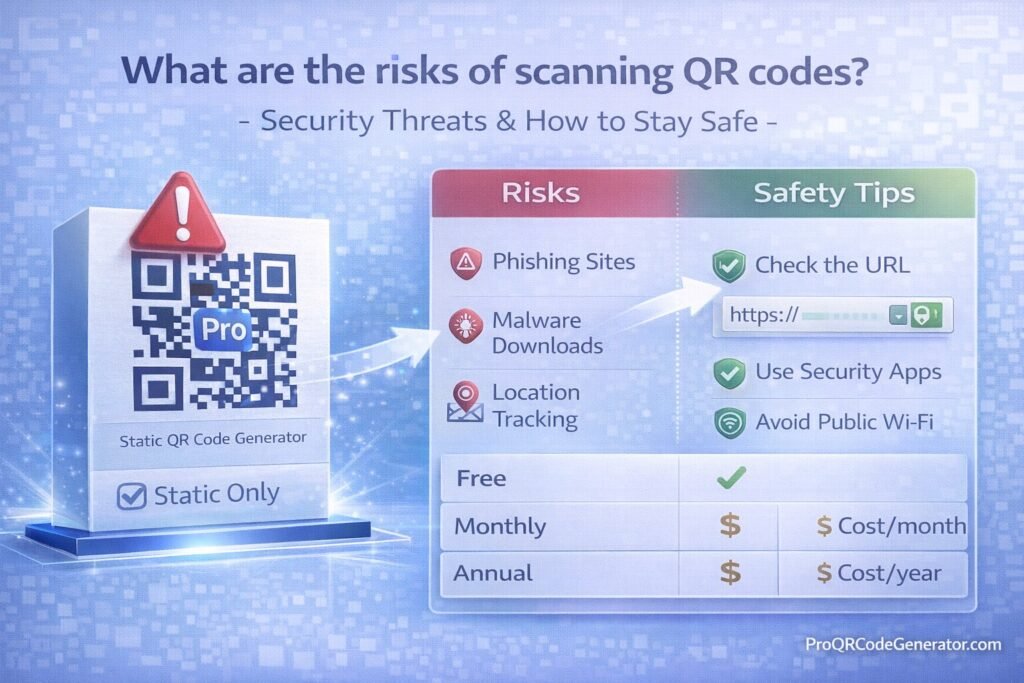
When asking what are the risks of scanning QR codes? – Security Threats & How to Stay Safe, we must evaluate both technical risks and behavioral vulnerabilities.
Primary Security Risks of Scanning QR Codes
1. QR Code Phishing (Quishing)
“Quishing” is phishing delivered through QR codes.
How It Works:
- Attacker generates malicious QR code.
- Code redirects to a fake login page.
- Victim enters credentials.
- Credentials are harvested instantly.
Common targets:
- Banking logins
- Email accounts
- Cryptocurrency wallets
- Microsoft 365 accounts
- Corporate SSO portals
Why It’s Effective:
- Users cannot see URL before scanning.
- Many mobile browsers auto-load.
- Small screens obscure full domain view.
2. Malicious Website Redirection
Some QR codes redirect users to:
- Drive-by download pages
- Exploit kits
- Malware payload delivery sites
- Fake update prompts
These sites may:
- Install spyware
- Trigger browser vulnerabilities
- Harvest device fingerprint data
Mobile devices are particularly vulnerable if:
- OS is outdated
- Browser security patches are missing
- Device lacks endpoint protection
3. Fake Payment Redirection
QR codes are widely used in:
- Restaurants
- Parking meters
- Retail checkouts
- Crypto transactions
Attackers replace legitimate payment QR codes with malicious stickers.
Victims unknowingly send funds to fraudulent accounts.
High-risk scenarios:
- Bitcoin wallet QR codes
- Instant payment apps
- Bank transfer redirects
Once funds are transferred, recovery is nearly impossible.
4. Credential Harvesting Attacks
QR codes can redirect to:
- Fake Google login pages
- Fake Apple ID portals
- Fake banking authentication pages
These pages often:
- Clone exact UI design
- Use HTTPS certificates
- Use similar domain spelling
Users trust the QR code environment (e.g., restaurant table) and lower their guard.
5. Malware Downloads
QR codes can trigger:
- APK downloads (Android)
- Malicious configuration profiles (iOS)
- Fake security apps
- Trojan installers
Once installed:
- Keystrokes can be logged
- Banking apps can be monitored
- Device data can be exfiltrated
6. WiFi Credential Exploitation
WiFi QR codes automatically connect devices to networks.
Malicious actors can:
- Set up rogue access points
- Capture traffic via man-in-the-middle attacks
- Monitor unsecured browsing
Public WiFi QR codes are especially risky.
7. Data Harvesting via Tracking Parameters
Even non-malicious QR codes may:
- Track device type
- Capture IP address
- Log scan location
- Record timestamp
- Identify browser fingerprint
While often legitimate for marketing analytics, this raises privacy concerns.
8. Social Engineering Amplification
QR codes placed in trusted environments create psychological authority:
- Government buildings
- Hospital posters
- Office entrances
- Event venues
Users assume legitimacy without verification.
The risk is not just technical—it’s behavioral.
Real-World QR Code Attack Scenarios
Scenario 1: Restaurant Menu Replacement
Attacker places sticker over original QR code.
Customers scan and enter payment details.
Card information is harvested.
Scenario 2: Corporate Office Phishing Campaign
Employees receive QR code flyer.
Code leads to fake HR portal.
SSO credentials compromised.
Scenario 3: Crypto Conference Attack
Malicious QR codes redirect to fake airdrop claim pages.
Wallets drained after signature approval.
Who Is Most at Risk?
- Small businesses using static QR codes
- Public event organizers
- Restaurants
- Crypto users
- Employees in hybrid workplaces
- Marketing teams using free QR generators
If your QR codes cannot be edited after printing, risk exposure increases.
Static vs Dynamic QR Codes: Security Implications
| Feature | Static QR Code | Dynamic QR Code |
|---|---|---|
| Editable after print | No | Yes |
| Redirect control | No | Yes |
| Analytics | No | Yes |
| Ability to disable | No | Yes |
| Threat response | Impossible | Immediate |
Dynamic QR codes significantly reduce risk because:
- Destination URLs can be changed instantly
- Compromised links can be disabled
- Suspicious traffic can be monitored
- Redirects can be audited
Platforms like ProQRCodeGenerator.com enable businesses to manage QR destinations centrally, minimizing long-term exposure.
Technical Breakdown: How Malicious QR Codes Work
Step 1: Encoding Malicious URL
Attacker encodes:
- Shortened link
- Redirect chain
- Obfuscated domain
Step 2: Delivery
- Sticker replacement
- Email PDF
- Poster insertion
- Social media distribution
Step 3: Execution
- Automatic browser open
- JavaScript payload
- Credential capture
- Redirect loop
The entire process can occur in seconds.
How to Identify a Suspicious QR Code
When evaluating what are the risks of scanning QR codes? – Security Threats & How to Stay Safe, detection awareness is essential.
Red Flags:
- QR sticker placed over another QR
- Misspelled brand names
- Urgent reward claims
- Unusual login requests
- Payment request outside expected flow
How to Stay Safe When Scanning QR Codes
1. Preview URLs Before Opening
Modern smartphones show preview links.
Check:
- Domain spelling
- HTTPS encryption
- Brand consistency
Avoid shortened URLs if possible.
2. Use a QR Scanner with URL Preview
Some apps display:
- Full URL
- Security rating
- Redirect history
Avoid auto-opening browsers.
3. Verify Physical Integrity
In public places:
- Inspect for sticker overlays
- Compare with printed branding
- Ask staff if unsure
4. Avoid Entering Credentials Immediately
If QR directs to login:
- Open official site manually instead
- Compare URLs carefully
5. Keep Device Updated
Security patches:
- Close exploit vulnerabilities
- Prevent drive-by downloads
- Block malicious scripts
6. Use Multi-Factor Authentication (MFA)
Even if credentials are stolen:
- MFA prevents account takeover
7. Avoid Sensitive Transactions via Public QR Codes
Especially:
- Crypto wallet transfers
- Banking transactions
- Business admin logins
Security Best Practices for Businesses Using QR Codes
Businesses asking what are the risks of scanning QR codes? – Security Threats & How to Stay Safe must consider operational safeguards.
1. Use Dynamic QR Codes
Dynamic systems allow:
- URL editing
- Instant disable
- Analytics monitoring
- Traffic anomaly detection
ProQRCodeGenerator.com provides dynamic redirection control, enabling businesses to mitigate exposure without reprinting materials.
2. Monitor Scan Analytics
Look for:
- Sudden traffic spikes
- Unusual geographic locations
- Repeated rapid scans
- Bot-like patterns
Analytics can signal abuse attempts.
3. Enable Secure HTTPS Landing Pages
Always:
- Use SSL certificates
- Avoid unsecured HTTP redirects
- Prevent mixed content warnings
4. Implement Redirect Controls
Control:
- Allowed domains
- Device type targeting
- Geo-targeting rules
If a page becomes compromised, redirect instantly.
5. Periodically Audit Printed QR Codes
- Inspect physical signage
- Replace worn labels
- Check for tampering
QR Code Analytics & Security Intelligence
Modern QR platforms provide:
- Timestamp logs
- Scan frequency
- Location heatmaps
- Device breakdown
- Referrer data
When monitored correctly, analytics becomes a defensive tool—not just a marketing metric.
Anomalies can indicate:
- Automated scanning
- Malicious traffic probes
- Scraping attempts
Dynamic QR infrastructure supports immediate containment.
ROI vs Risk: Are QR Codes Still Worth It?
Despite the risks of scanning QR codes, the ROI remains significant.
Benefits include:
- Contactless engagement
- Measurable offline-to-online conversion
- Campaign tracking
- Lead capture
- Event engagement
- Payment convenience
The key is controlled deployment.
Businesses using static QR codes without monitoring assume unnecessary risk. Those using managed dynamic systems maintain both flexibility and security.
Common Mistakes That Increase QR Code Risk
- Using free static generators for business campaigns
- Printing QR codes permanently without backup control
- Linking directly to raw payment portals
- Ignoring analytics
- Not updating landing pages
- Allowing unsecured HTTP pages
Security Considerations for Different QR Code Types
URL QR Codes
Highest phishing risk.
PDF QR Codes
Risk of malicious file replacement if hosted insecurely.
WiFi QR Codes
Risk of rogue network exploitation.
WhatsApp QR Codes
Lower risk, but potential spam redirection.
vCard QR Codes
Low risk, but can include malicious URLs inside contact fields.
Enterprise QR Code Governance Framework
For medium to large organizations:
- Centralized QR management system
- Access control & role permissions
- Redirect approval workflow
- Landing page vulnerability scanning
- Periodic URL audit
- Analytics anomaly monitoring
ProQRCodeGenerator.com supports centralized management that reduces fragmentation risk.
The Psychology Behind QR Code Trust
People assume:
- Physical placement = legitimacy
- Printed material = authenticity
- Branded signage = safe
Attackers exploit this trust bias.
Security awareness training should include QR phishing education.
Advanced Threat Vector: QR Code + Social Engineering Combo
Example:
- QR code offers “Free WiFi access”
- Redirect asks for email
- Email used for phishing campaign
- Later, credential reuse attack occurs
The QR code is merely the entry point.
Regulatory & Compliance Considerations
Businesses handling:
- Payment data
- Personal information
- Healthcare data
- Customer credentials
Must ensure QR landing pages comply with:
- Data protection regulations
- Encryption standards
- Privacy disclosures
Failure to secure QR pathways can result in liability.
The Future of QR Code Security
Emerging solutions include:
- Signed QR codes
- Blockchain verification
- QR authentication certificates
- AI anomaly detection
- Zero-trust redirect models
Security will increasingly integrate with analytics platforms.
Frequently Asked Questions
Are QR codes inherently dangerous?
No. QR codes are neutral containers. Risk depends on destination and management.
Can scanning a QR code hack my phone?
Scanning alone typically cannot. The risk arises from interacting with malicious landing pages.
Are static QR codes less secure?
Yes, because they cannot be updated or disabled after printing.
Can antivirus detect malicious QR code websites?
Sometimes, but not always. Phishing sites often evade detection initially.
Is it safe to scan QR codes in restaurants?
Usually, but verify physical integrity and preview URLs.
How can businesses reduce QR phishing risk?
Use dynamic QR systems, monitor analytics, and audit printed materials.
Conclusion: Managing the Risks of Scanning QR Codes
So, what are the risks of scanning QR codes? – Security Threats & How to Stay Safe?
The risks include:
- Phishing attacks
- Malware downloads
- Payment fraud
- Credential theft
- Rogue WiFi exploitation
- Data tracking abuse
However, QR codes themselves are not the problem. Poor management and static deployment create exposure.
Individuals should:
- Preview URLs
- Avoid entering credentials blindly
- Keep devices updated
Businesses should:
- Use dynamic QR codes
- Monitor analytics
- Enable redirect control
- Secure landing pages
Platforms like ProQRCodeGenerator.com demonstrate how professional QR infrastructure combines marketing performance with security oversight—without overcomplicating deployment.
QR codes remain powerful tools. With intelligent governance, they are both safe and highly effective.

